
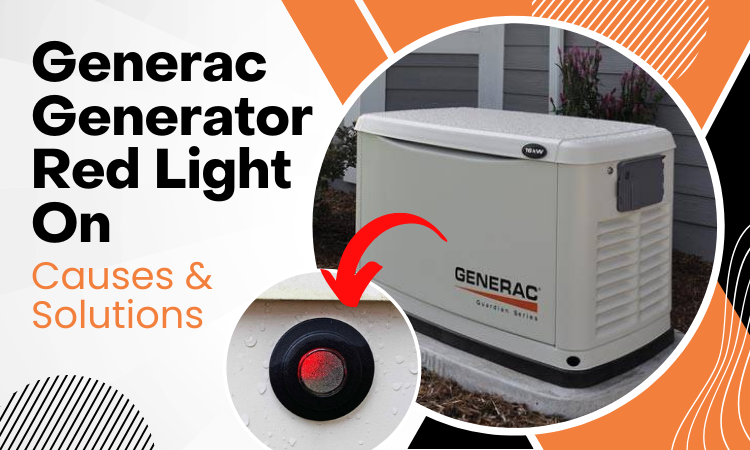
Generac Generator Red Light On [Causes & Solutions]
Updated: February 1, 2026
Seeing a red light on your Generac generator can be alarming. But don’t worry. In most cases, it’s something you can identify quickly. Let me walk you through what that red light means and what you can do about it.
- Low oil pressure (Code 1300), the most common cause
- Overload (Code 2100)
- Overcrank (Code 1100), meaning it failed to start
- Battery problems
- RPM sense loss (Codes 1501/1505/1511/1515)
Related guides: Charger Missing AC (Code 2780) • Weekly test not working
So, why is your Generac generator red light on? Let’s break it down.
Contents
- 1 What Do The Lights Mean On A Generac Generator?
- 2 Generac Generator Red Light: Causes and Solutions
- 3 How To Reset Generac Generator Red Light
- 4 How To Reset Generac Generator Yellow Light
- 5 When To Call A Professional
- 6 Tips To Prevent Red Light Issues
- 7 Conclusion
- 8 Frequently Asked Questions
- 8.1 What does a red light on a Generac generator mean?
- 8.2 How do I reset the red light on my Generac generator?
- 8.3 Why is there a red and yellow light on my Generac generator?
- 8.4 What does a half green half yellow light mean on a Generac generator?
- 8.5 What type of oil should I use in my Generac generator?
- 8.6 Free Download: Storm Ready Power Checklist
- 9 Sources
What Do The Lights Mean On A Generac Generator?
Before we dive into the red light specifically, here’s a quick reference for all three indicator lights on your Generac:
| Light Color | Meaning | Action Needed |
| 🟢 Green | Ready to run. Everything is normal | None. You’re good! |
| 🟡 Yellow | Maintenance reminder or minor warning | Check maintenance schedule, inspect unit |
| 🔴 Red | Fault detected. Generator shut down | Identify error code, may need service |
If you’re seeing a yellow light, check out my guide on how to reset the yellow light below.
Generac Generator Red Light: Causes and Solutions
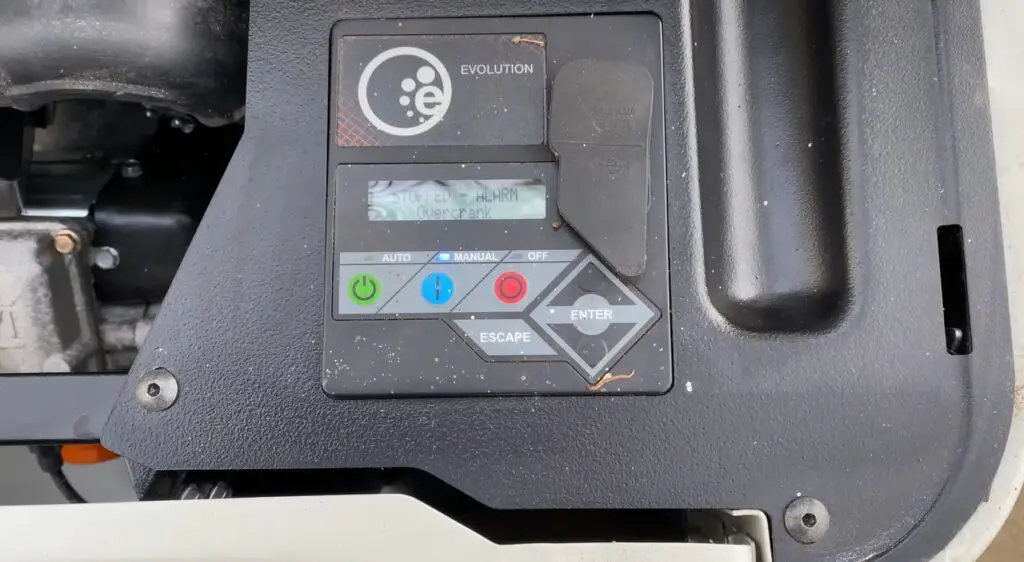
Here’s a breakdown of what triggers that red light and what you can do about it:
| Cause | Error Code | Solution |
| Low oil pressure | 1300 | Check/add oil, inspect oil pump |
| Overload | 2100 | Reduce electrical load |
| Overcrank (won’t start) | 1100 | Check fuel, reset controller |
| RPM sense loss | 1501/1505/1511/1515 | Clear alarm, reduce load, restart |
| Battery issues | Varies | Test/replace battery |
| Overheat | 1400 | Let cool, check ventilation |
| Undervoltage | 1600 | Call service technician |
Let’s go through each one in detail.
Cause 1: Low Oil Pressure (Code 1300)
This is the most common reason for a red light. When oil levels drop too low, or the oil gets contaminated, your Generac shuts down to protect the engine.
If your display shows Code 1300, it’s definitely an oil pressure issue.
What to do:
- Check the oil level using the dipstick
- If low, add the recommended oil (Generac 5W-30 or 10W-30 Full Synthetic)
- If the oil looks dark or dirty, change it completely
- Don’t overfill. That can cause problems too
If the oil level is fine but you’re still getting the error, the oil pump or pressure switch might be faulty. That’s when you should call a technician. these parts aren’t DIY-friendly.
For more details, check out our complete guide on Generac generator low oil pressure.
Cause 2: Overload Condition (Code 2100)
Running too many appliances at once? Your generator will shut down to protect itself.
The Code 2100 means your generator is being asked to produce more power than it’s rated for.
What to do:
- Turn off non-essential appliances
- Wait a few minutes
- Reset the generator and restart
A typical Generac home standby can handle around 22,000 watts, but check your specific model’s rating. If you’re still having issues after reducing the load, see our guide on how to fix an overloaded generator.
Cause 3: Overcrank (Code 1100)
When your generator tries to start but fails repeatedly, it triggers an overcrank fault. This usually happens after a power outage when the unit attempts to start but can’t.

What to do:
- Check if the gas supply is turned on (the handle should be lined up along the pipe)
- Make sure there’s fuel in the tank
- Reset the control panel (see reset steps below)
- Try starting again
If it still won’t start, the issue might be internal. time to call a service dealer.
Cause 4: Battery Problems
A weak or dead battery can trigger the red light because the generator can’t start properly.
What to do:
- Check the battery voltage (should be around 12.6V when fully charged)
- If it’s low, try charging it
- If the battery won’t hold a charge, it needs to be replaced
Most Generac batteries last 3-5 years. If yours is older, replacement might be due.
Cause 5: RPM Sense Loss (Codes 1501/1505/1511/1515)
If your generator suddenly shuts down while running, it might have lost RPM sense. You’ll see one of these error codes: 1501, 1505, 1511, or 1515.
What to do:
- Press ENTER twice to clear the alarm
- Press AUTO
- Reduce the load on your generator
- Press AUTO again and let it restart
If it keeps happening, check the battery from the control panel (Main Menu → Battery Menu). If it says “check battery,” you need a new one.
Cause 6: Maintenance Required
Sometimes the red light isn’t a fault. It’s just reminding you that maintenance is overdue. This could mean:
- Oil change needed
- Air filter needs cleaning
- Spark plug replacement due
If your generator’s red light appeared right after it skipped a self-test or maintenance cycle, check out our guide on Generac generator weekly test not working.
Other Causes
Less common issues that can trigger a red light include:
- Overspeed/Underspeed. engine running too fast or slow
- Undervoltage/Overvoltage. electrical output problems
- Stepper overcurrent. internal component issue
- Miswiring. installation problem
These typically require a professional to diagnose and fix. Don’t try to troubleshoot electrical issues yourself.
How To Reset Generac Generator Red Light
Here’s the step-by-step process to reset your Generac and clear that red light:
Step 1: Turn Off the Generator
Press the OFF button on the control panel. Then press the UP button twice, followed by ESC.
Step 2: Access the Dealer Menu
Press DOWN once, then UP once, then ENTER. You’ll see the “Dealer Edit” menu appear.
Step 3: Reset Maintenance
Press UP until you see “Reset Maintenance” and press ENTER. Then press ESC until the display shows a blinking “System” message.
Step 4: Return to AUTO Mode
When you see “System,” press ENTER, then AUTO. The display should now show “Ready to Run” and the light should turn green.
Quick reset method: If you just need to clear a fault, try pressing ENTER twice, then AUTO. This works for many common errors.
How To Reset Generac Generator Yellow Light
A yellow light usually means maintenance is due. Here’s how to reset it:
- Turn the generator OFF
- Press ENTER twice
- Select AUTO
The yellow light should clear. If it comes back, make sure you’ve actually completed the required maintenance (oil change, filter cleaning, etc.).
When To Call A Professional
Here’s my honest advice: call a technician if:
- The red light won’t clear after resetting
- You smell gas or see smoke
- The error code keeps coming back
- You see codes related to voltage, wiring, or internal components
- The generator is making unusual sounds
- You’re not comfortable working with the control panel
Generators involve electricity, fuel, and moving parts. If something seems off, it’s better to be safe than sorry. A certified Generac technician can diagnose problems quickly and fix them properly.
Tips To Prevent Red Light Issues
A little maintenance goes a long way:
- Run the weekly test – let your generator exercise regularly
- Check oil monthly – low oil is the #1 cause of red lights
- Change oil annually – or every 200 hours of operation
- Keep it clean – debris can cause overheating
- Inspect the battery – replace every 3-5 years
- Don’t skip maintenance – small issues become big problems
For a complete guide on testing, see Generac generator weekly test guide.
Conclusion
A red light on your Generac generator isn’t the end of the world. It’s your generator telling you something needs attention. Most of the time, it’s something simple like low oil or an overload condition.
Check the error code, follow the steps above, and you’ll likely have it running again in no time. But if you’re ever unsure, don’t hesitate to call a professional. These machines are too important (and too expensive) to risk damaging.
Got questions? Drop them in the comments below. Good luck!
Frequently Asked Questions
What does a red light on a Generac generator mean?
A red light means your Generac has detected a fault and shut down for safety. It won’t run in automatic mode until the issue is resolved. Common causes include low oil pressure (Code 1300), overload (Code 2100), overcrank (Code 1100), or battery problems. Check the display for a specific error code to identify the exact issue.
How do I reset the red light on my Generac generator?
For a quick reset: press ENTER twice, then press AUTO. For a full reset: press OFF, then UP twice, ESC, DOWN once, UP once, ENTER to access the Dealer menu. Navigate to “Reset Maintenance,” press ENTER, then ESC until you see “System.” Press ENTER, then AUTO. The light should turn green.
Why is there a red and yellow light on my Generac generator?
Seeing both red and yellow lights usually indicates multiple issues: a fault condition (red) plus a maintenance reminder (yellow). Start by addressing the red light fault first. Check the error code and resolve that issue. Then handle the yellow light, which typically means routine maintenance like an oil change is due.
What does a half green half yellow light mean on a Generac generator?
A partial green and yellow light indicates your generator is operational but has a maintenance reminder. It’s not an error, just a heads up that service is due soon. Check the air filter, oil level, and battery. After completing maintenance, reset the light by pressing ENTER twice and then AUTO.
What type of oil should I use in my Generac generator?
Generac recommends 5W-30 or 10W-30 Full Synthetic Oil. Use 5W-30 for temperatures below 40°F or for year-round use. Change the oil after the first 20-30 hours of operation, then every 100-200 hours or annually after that. Always check your owner’s manual for your specific model’s requirements.
Free Download: Storm Ready Power Checklist
Be prepared before the next power outage. Our printable checklist covers everything from pre-storm prep to post-storm maintenance.
Sources
- Generac Support: Troubleshooting Indicator Lights
- Generac Home Standby Generator Owner’s Manual
- Generac Product Support & Manuals
First time used and with in 15 minutes, carbon monoxide alarms went off. Then generator turned off after running for approximately 1 1/2 hours. Red light on. Called Pioneer in Knoxville TN. No return calls. Bad weather so don’t think they will come out in this ice storm.
Hey, I’m glad the CO alarms did their job, carbon monoxide is no joke and can be deadly.
Please don’t run the generator again until a certified technician checks it out. With CO alarms going off, this isn’t a DIY situation.
If anyone in the house has headaches, dizziness, or nausea, get fresh air immediately and call 911 if symptoms are serious.
I know Pioneer isn’t responding, but try calling Generac directly at 1-888-GENERAC. They can help find another authorized dealer in your area.
Stay safe.